Contributing to Nova
Pull Requests
In general, the development flow for Nova follows PMC's standard process.
You'll create a feature branch, write code, test, pass the code review, and deploy.
Nova pull requests require an approval by someone in the Nova code-owner group.
Formatting your pull request
Nova pull requests require two things:
- To be tagged with the
Novalabel, providing a history/changelog of all Nova merges (opens in a new tab). - Include a filled-in copy of the pull request template (opens in a new tab).
Both of these can be automatically applied to a new PR by appending this string
to the new-PR URL: &template=pmc-nova.md&labels=Nova.
Prepping the build
The output from npm run nova build will include everything needed for Nova's
build.
You can commit these files as-is.
Issues? See troubleshooting Nova builds for more information.
Running PHPCS
After SSH'ing into vagrant, navigate to the root of pmc-plugins/pmc-nova and
run phpcs ./.
Running PHPUnit
Follow the steps in pmc-vvv to setup and run tests.
Running ESLint
From /style-guide/ directory, run npm run lint or npm run lint -- --fix.
Documentation
Healthy documentation is key for any successful software project, but creating documentation isn't easy. It's time consuming and requires skills we often taken for granted.
This section aims to clarify expectations and offer guidance/tools for writing better documentation.
For the mechanics of updating pmc-docs, refer to "Contributing to the Docs".
Ease of use
Documentation should require as little effort as possible to maintain, so we've tried to reduce the friction as much as possible.
If you're experiencing blockers or headaches, please raise them in the #engineering-documentation Slack channel.
Expectations of ourselves and our peers
Everyone who works with Nova is expected to contribute to the documentation.
While this is already the expectation at PMC for similar projects and codebases, we haven't followed through with consistent best practices.
Inviting someone to contribute
A simple way to improve our documentation is by inviting others to contribute and collaborate when you identify an opportunity to do so.
This isn't about giving people homework, it's about holding ourselves and each other accountable for the ongoing production and maintenance of something valuable. Whenever possible, offer to collaborate, proof-read, or otherwise assist in the process.
Example situations where you should invite additional documentation:
- A question is asked and answered in Slack. (Keep an eye on
#all-questions-welcome) - When you see something new or unusual in a code review.
- After a 911.
Collaborative writing
Consider jumping on a quick Zoom or Huddle to make a small change collaboratively. This is an easy way to just get it done and avoid it becoming stale on your todo list.
Protip: Did scrum end early? Take 5 minutes as a group to improve something in the documentation.
Approaching documentation with the Diátaxis framework
Diátaxis is an approach to quality in technical documentation. It describes an information architecture that emerges from a systematic approach to understanding the needs of documentation users.
Diátaxis is light-weight, easy to understand and straightforward to apply. [...] It helps make projects, and the teams that work with them, more successful.
We suggest spending some time with Diataxis.fr (opens in a new tab) to become familiar beyond this summary.
The philosophy
Our summary: pick anything small and improve it.
This is obviously an oversimplification, but not by much. Diátaxis values small incremental changes to allow documentation the space needed evolve naturally over time.
Rather than planning structure and organizing content, we should just be writing content, adjusting and tweaking as we go.
Keep reading, "How to use Diátaxis" (opens in a new tab).
Thinking about content
Diátaxis identifies four modes of documentation - tutorials, how-to guides, technical reference and explanation. It derives its structure from the relationship between them.
In Diátaxis, each of these modes (or types) corresponds to a different user need. Each fulfils a different purpose and requires a different approach to its creation.
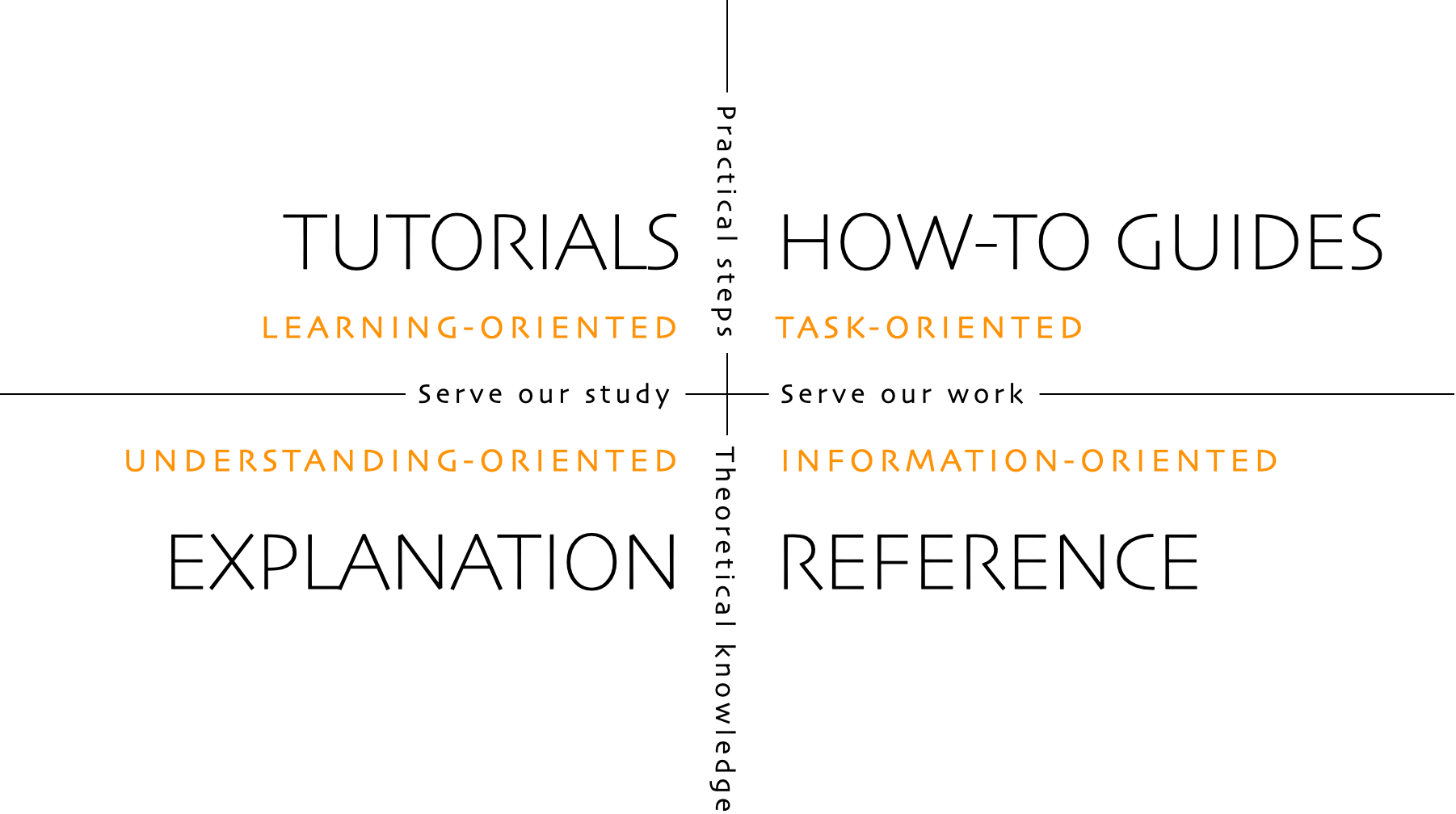
In other words, what we call documentation is fundamentally not one thing, but four. Understanding the implications of this, and how those four different things work, can help improve most documentation.
Keep reading:
- Tutorials (opens in a new tab) - Tutorials are lessons that take the reader by the hand through a series of steps to complete a project of some kind. Tutorials are learning-oriented (examples).
- How-To Guides (opens in a new tab) - How-to guides are directions that take the reader through the steps required to solve a real-world problem. How-to guides are goal-oriented (example).
- References (opens in a new tab) - Reference guides are technical descriptions of the machinery and how to operate it. Reference material is information-oriented (example).
- Explanations (opens in a new tab) - Explanation is discussion that clarifies and illuminates a particular topic. Explanation is understanding-oriented (example).